FileZilla is an open-source success story. It's an FTP client that's attractive, reliable, regularly updated and a very good example of it's type. If you're looking for a file transfer solution, it should be the first program you check out.
In fact, FileZilla isn't just limited to FTP - it also handles FTPS and SFTP for secure transfers of multiple files on multiple servers. The interface gives you a quick outlook of all your transfers, sites and disks and makes it easy to drag and transfer. The QuickConnect button - which lets you access your favorite server in seconds - is a great feature. FileZilla is fairly fast, and can resume downloads and handle very big transfers, higher than 4GB. You can set both local and remote filters for things like images, explorer files or CVS and SVN directories or even create your own. FileZilla also includes a tool to compare directories in terms of file size or modification time. The application can guide you when setting up your network and lets you set speed limits in case you don't want to overload your bandwidth. One thing really missing from FileZilla though is a scheduler to automatically set transfer times.
Twitter's official desktop app TweetDeck has finally come out of beta, and joins the website and mobile apps as part of the redesign of the service.
TweetDeck allows you to follow any number of Twitter and Facebook accounts you run in one columned application. The biggest change with this version of TweetDeck is it no longer installs through Adobe AIR, making getting started that little bit faster.
The appearance of TweetDeck is largely unchanged. It's clean and easy to understand, and still probably the best app for using multiple accounts. The default setting features a Home feed of updates from all your accounts together. Then there is the @Me feed, which shows all interactions with you on Twitter or Facebook. Finally there is an Inbox for Direct Messages in Twitter. You can add to any of these from a selection of things like Lists or Tweets, and remove any of them too.
TweetDeck is absolutely essential if you use more than one Twitter account. It's easy to use, and very clearly designed, with the added security of Twitter's official support. Making a real installer so Adobe AIR isn't required is a great improvement on earlier versions too.
Recent changes
Browse easily:
· Now your columns are arranged in one continuous horizontal row, allowing you to navigate smoothly left and right with the scrollbar.
· You can scroll several columns at a time by clicking the arrows either side of the “Columns” button on the top toolbar. You can also click the “Columns” button to reveal the full list of all the columns in your TweetDeck and access any column immediately.
Manage your columns:
· With the addition of the new Columns button it’s now easier to arrange your columns. With the column drop-down open, simply hover over the “drag” icon to the right of the column name you wish to move, click and drag the column to its new position, then drop.
Act on what's happening:
· A menu icon on every Tweet gives you instant access to more Tweet actions, like “Create link”, and user-related actions, like “Block”. This makes it possible report a user for spam, add an account to a list, delete your own Tweet, and much more, all without having to leave your main column view.
The world’s No. 1 mobile office today! # Installed on over 100 million devices in more than 205 countries # Over 40,000 registrations per day # No. 1 app in Google Play Business category
Made by MobiSystems, OfficeSuite Pro allows you to view, create, edit, print and share Word, Excel and PowerPoint files on the go. You can also open attachments and see PDF files on an Android based phone or tablet with our feature-rich mobile office solution. OfficeSuite Pro includes a File Browser and integration with Cloud service leaders: Box, DropBox, Google Drive, SkyDrive and SugarSync to give users a multitude of options on how to manage files and attachments. ---OfficeSuite Pro 7 Out Now! New Features--- * New and improved UI * Side bar navigation in the File Browser for quick access to different folders and remote third party cloud services
* Templates - OfficeSuite Pro 7 users can benefit from a wide range of templates, from Resume and Invoice templates to Travel Planner and Weight Loss Tracker templates, among others * Extended Cloud support - now compatible with Microsoft SkyDrive. Google Drive support has been improved, by adding folder support, thus allowing for optimized document view
Docs Editor: * Styles - apply MS Word styles or styles used in the document * Table design – ability to fashion an inserted table as per our library of tailor-made designs * Formulas (display only) * Format painter Spreadsheet Editor: * Improved selection of parameters in functions Slides Editor: * Animations PDF Viewing: * A new PDF engine using library from Adobe, providing instant opening of large PDF files * Find/Find Next --File Formats Supported-- * Text format - DOC, DOCX, DOCM, RTF, TXT, LOG * Spreadsheet - XLS, XLSX, XLSM, CSV * Presentation - PPT, PPTX, PPS, PPSX, PPTM, PPSM * Other formats - PDF, EML, ZIP --Easy File Access and Sharing-- * With the integrated File Browser you can easily access, modify and share your local or Cloud stored files. OfficeSuite integrates with Google Drive, DropBox, Box, SugarSync and SkyDrive * Easily open email attachments * Work with Outlook EML files * Share documents via Email or Bluetooth --Intuitive and Intelligent Design-- * OfficeSuite 7 comes with new intuitive design and user experience allowing quick and intuitive workflow while you manage your files or create and modify documents. * New side bar gives instant access to local and cloud stored files. * Two-finger zoom, multi-touch support, context toolbars and popup menus make your work with OfficeSuite quick and fun.
--OfficeSuite Extensions-- * QuickSpell – fully integrated with OfficeSuite Pro QuickSpell will help you dramatically improve your typing accuracy. * Font Pack – allows you to use Microsoft most used fonts in OfficeSuite text documents. * Oxford Dictionary of English - look up word meaning in office text documents in the most popular English dictionary ** Note that OfficeSuite Extensions are sold separately. Purchasing any of the extensions is optional.** Compatible with Sony Ericsson LiveDock™ Multimedia station. com.sonyericsson.extras.ATTACHED Works great on a big screen with MHL!
Opera Mini is a mobile web browser designed to help you browse the web in comfort and at high speeds on your phone. Version 6 of the pint-sized program has borrowed much more from its desktop-based big brother, so if you enjoy using Opera on your PC or Mac then you can now look forward to a similarly smooth ride on your mobile with Opera Mini. The user interface in Opera Mini 6 is more usable than ever. The hub of the app is the Speed Dial feature, where you can set one-click shortcuts for up to nine of your favorite sites. Just like in the desktop version, these display thumbnail previews of the sites to make things as clear and simple as possible.
Opera Mini utilizes a tab-based interface, meaning that you can load multiple pages at once simply by clicking on the plus arrow in the top right-hand corner. Version 6 includes the ability to open links in the background, just by holding down a link and selecting 'Open in new tab'. Navigating with Opera Mini Other navigational aids include an auto-complete feature in the address bar, and a built-in search bar. Unfortunately this search bar only supports Google and is not customizable with other search engines. Viewing pages in Opera Mini 6 is a delight. As with the previous version, you can opt to view the whole web page on screen or simply tap to zoom in to a particular area. The latest version finally adds support for pinch-to-zoom, provided you have a multi-touch device that supports this feature. If not, you can zoom incrementally.
Other features For those who love to tinker around with stuff, Opera Mini 6 is sure to please because the program is simply rammed with options. You can alter image quality, font size, and screen orientation, and there is a wealth of privacy settings too. As you'd expect, there's also support for bookmarks and browser history. Opera Mini 6 adds support for sharing links via Facebook, Twitter or email. Unlike the latest desktop version, Opera Mini doesn't support extensions. This is a shame, because it would be great if developers could add functionality to the browser through third party plug-ins, as they can with Firefox Mobile. Load times in Opera Mini are as impressive as ever thanks to Opera's unique server-side rendering technology. It compresses images and graphical elements before delivering them to you. This makes pages quicker to load, and is ideal for those who pay for data by the KB. If you want a more all-singing, all-dancing web experience then try Opera Mobile instead, which doesn't compress pages like Opera Mini, and which supports HTML 5. Opera Mini 6 is one of the leanest mobile browsers around, delivering pages quickly but not skimping on features.
Notes
To download the latest version of Opera Mini for Symbian, visit from your mobile browser
For quite sometime; Microsoft Corporation has been a market leader when it comes to producing software applications. Windows have been one of its brilliant inventions that have taken the world of computing with a storm. Windows 8 is the latest operating system that Microsoft has released. This operating system combines both modern user interfaces normally installed in tablets with the conventional Windows desktop. With such integration, most people have opted for Windows 8 download in great measure.
Overview
Human beings tend to be skeptical about new inventions hence; some may be hesitant to try out this particular latest invention from Microsoft. However, this should not be the case because Windows 8 download just like most of the windows have trial versions. With the trial version, you can get an opportunity to test this slick as well as firm operating system. This new operating system promises to modernize how you browse as well as viewing files.
The developments of windows 8 download indeed began before Windows 7 was release. This latest Windows came into glare of publicity after three consecutive versions that were pre-released in the year 2011 between September and May. Together with manufacturing process, a full version release commenced in August 2012, its availability among different stores began in October 2012. The latest version has undergone tremendous changes geared towards efficient implementations of Windows 8 download in tablets and other mobile devices to give it a competitive edge with iOS and android.
Windows 8 is different from a whole range of operating system released by Microsoft in the sense that, there is an introduction of a touch friendly user interface. The start screen displays grids that are animatedly updated representing the various applications that are installed. These grids or squares act as shortcut meant to open a particular program. Each and every panel can easily be customized, to enable you group applications together. Another innovation that Windows 8 has is the new Windows 8 store, used for downloading or purchasing applications used in enhancing the functionality of this new operating system.
This new Operating system released by Microsoft also makes the most of several technologies such as cloud computing, near field communications, and USB 3.0 among others. It also has in-built antivirus capacity. In addition to that, Windows 8 also make use of the secure boot feature. This feature digitally signs the operating system and make it secure from malwares whose intention is to change the boot process. Its optimization makes its installation a bit unique in comparison to other operating system.
New features
Flash: One of the fundamental updates in Windows 8 download is flash. Working in conjunction with one another, Adobe and Microsoft have designed a situation-specific edition of flash that works effectively with Internet Explorer 10. This makes it possible for flash to run anytime you want it to, for instance when you play-back your videos. The best part is that, this flash does not affect the performance of your PC or even battery life unnecessarily. This aspect is very essential for those who use Windows RT because they value their PC performance as well as battery life.
Surfing the web: A lot of loose ends in regards to stability that were common in its preview versions have been tied up by latest Windows 8 download. Another feature that Window 8 users are supposed to expect is Flip ahead. This feature utilizes what is known as crowd-sourcing in order to predict the web page that you are bound to open nest in the course of your web surfing. Share feature is also another addition found in Windows 8 that allows users to share web pages with colleagues and friends.
Mail feature: This particular feature has been set to enhance a superb experience. You can go as far as pinning several inboxes on your start screen to distinguish your separate email accounts easily. Moreover, threaded conversion feature that group emails that are from matching conversation thread is also available.
Thanks to technology, you do not necessarily have to walk in some offline stores to purchase a copy of Windows 8. This is mainly because you can get Windows 8 download from a number of reputable sites. The best thing about most of these sites is that you can also get windows 8 free download in form of a trial version. Nevertheless, you can still find windows 8 free download full version which will guarantee you great experience almost equal to that which you can avail from a commercial version of Windows 8 download.
Select the Version You Want to Download
All downloads are provided as ISO images. Start by choosing the 32-bit or 64-bit version. Each version is available in the following languages: Chinese (Simplified), Chinese (Traditional), English, English (UK), French, German, Italian, Japanese, Korean, Portuguese (Brazil), and Spanish.
Download the 32-bit (x86) version:
Download the 64-bit (x64) version:
We are really sorry for this is an open source software.
Here is a unique collection of IP address widgets which shows your visitors their Ip address,operating system,country,browser and the version of the browser.It is cool thing to display ip address to your visitor's specially if you have TECH related blog.
Now you can get these any of these widgets and add these to your blogs by following these steps -
Get Ip Address Widget for your blog
1 .Choose any widget they are in different size and shapes,choose any according to your blog requirement.
2. Login to blogger dashboard ,and the click on Layout - > page Elements .
3. ADD a new HTML/Javascript gadget anywhere in your blog.
4. Copy any code from below(all are working) and paste in to HTML / Javascript gadget and then save your gadget.
5 Done,Your widget is Now live
1 .Square Ip Address Widget (Height=125px, Width=125px)
No Bangla Fonts Needed has built in Automatic Virtual Font Installer
No Administrator Privilege Needed
All your settings/personalizations remain intact
Has all other features of Standard Edition
Spell check never mess things up:
As Avro Keyboard supports Input Language/Input Locale changing for Bangla (India), Bangla (Bangladesh) and Assamese, the editors (Like MS Word) you use to type Bangla can detect which is Bangla text and which is not. Now MS Word never try to check spell of your Bangla text using the default English dictionary!
You can safely turn on the auto correction feature in MS Word when typing Bangla with Avro keyboard. Your texts will never be changed to any alien characters. Now MS Word knows that you are typing Bangla!
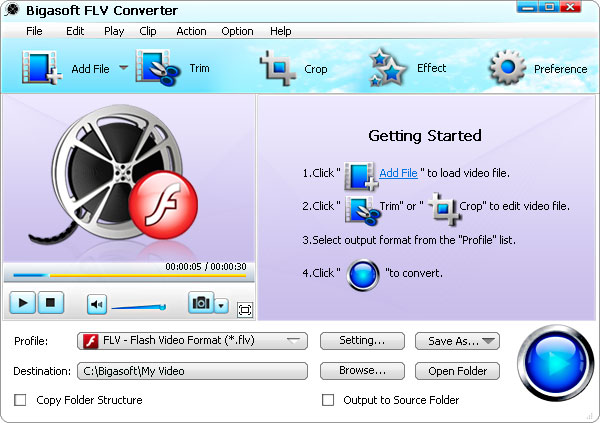
Bigasoft FLV Converter is a great way to help you convert FLV and online videos like YouTube video, MySpace and so on to popular video formats such as AVI, Xvid, DivX, MP4, WMV, MOV, MPEG, MPG, etc. with excellent quality for fun beyond web pages.