Home » Posts filed under Converter
Posted by
Unknown on Monday, August 5, 2013
DVDVideoMedia Free WMA MP3 Converter is the unwieldy - and inaccurate - name of a versatile audio format converter.
From the name, you wouldn't be blamed for thinking that DVDVideoMedia Free WMA MP3 Converter converts WMA files to MP3. It does, but it also converts from almost any other format you can throw at it, as well as ripping audio from video and batch converting files.
 DVDVideoMedia Free WMA MP3 Converter is very easy to use. Import source files using the Add button, or by dragging and dropping. Check the files you want to convert, trim them if necessary using the Clip button and hit Convert. This application does the job smoothly and quickly.
There's nothing particularly noteworthy about DVDVideoMedia Free WMA MP3 Converter, but for a standard format converter - and there are lots of them - it's pretty solid. If you want more flexibility and features, we'd recommend an app like Format Factory or Any Video Converter, but for straight up conversions to MP3, especially if you're ripping CDs or doing files in batches, DVDVideoMedia Free WMA MP3 Converter works a treat.
DVDVideoMedia Free WMA MP3 Converter is a solid app that will convert just about anything to MP3.
DVDVideoMedia Free WMA MP3 Converter supports the following formats
DVDVideoMedia Free WMA MP3 Converter converts almost all popular audio formats (WMA, WAV, AAC, FLAC, OGG, APE, etc.) to WMA MP3 audio files, as well as extracts WMA MP3 music from just about any video formats including high-definition (HD) video formats (AVI, MPEG, MP4, WMV, H.264/MPEG-4 AVC, AVCHD, etc.).
Pros - Very easy to use
- Clip music tracks
- Batch convert tracks
-
-
-
Posted by
Unknown

4Free Video Converter is a video conversion app that's able to handle bunches of formats for all types of devices.
Video converters - there's more of them on the market that almost any other type of software, but very few of them impress. How does 4Free Video Converter hold up against accepted leaders, like
Format Factory and GOM Video Converter? Well, in short, 4Free Video Converter is good, but not great, like a good many of its contemporaries.
For a start, 4Free Video Converter is ugly. Really ugly. Whoever decided that sludge green made a good interface color was wrong - and there's no option to change it! That said, the color doesn't impact on the usability, so it's pretty easy to load videos up, decide where to save them, and pick the format you want to convert to.
The good thing about picking a format is that 4Free Video Converter has all of the options nicely arranged by both format and device compatibility, which makes it easier to choose. It also allows you to customize formats for your own specifications, but this feature seemed buggy, didn't always work, and wouldn't let us save any presets for future use.
On the upside, 4Free Video Converter does allow you to convert batches of videos, but it doesn't have an automatic shutdown feature, so you'll have to wait until they're finished before you go to bed. Also bear in mind that although it's called "4Free" Video Converter, this is a limited "freemium" app, and so some of the features you can see on the interface are not actually available.
4Free Video Converter - it's good, but not great, and misses all the nice touches that make the perfect conversion app.
4Free Video Converter supports the following formats
Video Format: AVI, MPEG, WMV, MP4, FLV, MKV, H.264/MPEG-4, DivX, XviD, MOV, M4V, VOB, ASF, 3GP, 3G2, SWF, H.261, H.264, DV, DIF, MJPG, MJPEG, DVR-MS, NUT, QT, YUV, DAT, MPV, NSV
AVCHD Video (*.mts, *.m2ts), H.264/MPEG-4 AVC (*.mp4), MPEG2 HD Video (*.mpg; *.mpeg), MPEG-4 TS HD Video (*.ts), MPEG-2 TS HD Video (*.ts), Quick Time HD Video (*.mov), WMV HD Video (*.xwmv), Audio-Video Interleaved HD Video (*.avi)
Audio Format: MP3, WMA, AAC, WAV, CDA, OGG, FLAC, APE, CUE, M4A, RA, RAM, AC3, MP2, AIFF, AU, MPA, SUN AU Format
Pros
Good selection of formats
Basic editing features
Pause conversions
Cons
Inexcusably ugly interface
A little buggy
Some features not available in this version
Posted by
Unknown

AnyVideo Converter HD is a powerful video converter designed specifically for Windows which looks slick and has a very simple user interface. AnyVideo Converter HD supports drag and dropping of files into the converter interface and is suitable for those that have never converted video before. Simply select your target device and AnyVideo Converter HD selects the best conversion type for you. AnyVideo Converter HD works with a huge number of formats including MKV files, allows you to select the audio or subtitle track you want to convert and can even improve image quality using automatic deinterlacing.
Pros - Slick and easy to use
- Automatically detects settings depending on device
- Supports MKV files
- Deinterlaces images
Author's Description
The best choice to convert videos for your Apple TV, iPad, iPhone, iPod, Xbox 360, PlayStation 3, PlayStation Vita, PSP, computer, mobile phone: Blackberry, Nokia, Samsung, Android e many others! AnyVideo Converter HD is the easiest and fastest way to convert all your movies for your device AnyVideo Converter HD is easy to use. No settings and no technical knowledge required. Simply drag your videos on the AnyVideo Converter HD, and all your videos will be converted quickly and in the best way you need.
Special features * High Speed video conversion using Remux * Suited for .mkv files * Audio language selection * Extract audio track from your movie * Subtitles selection (chosing one from original file or adding from external file) * Automatic deinterlace for better view on digital screen * Works with 5.1 - 6.1 and 7.1 audio files * Sync with iTunes for all Apple devices * Encoding engine optimized for 32 bit and 64 bit * The conversion keeps the right aspect ratio of the source without any stretch * No change in video color palette * Video and audio codecs used for conversion are the best choice for the output device * No ads * No technical knowledge needed for using the software * Convert also audio file to mp3 or m4a
Remux Some files can be converted just rearranging only audio and/or video data in the new video format. For example an .mkv file with H264 video codec can be converted for Apple TV 3rd generation just converting only audio tracks if needed. In this case you can convert a 8GB
All people want convert entire movies and films collection. AnyVideo Converter HD is ultra fast by optimizing the use of all processors and is designed to maximize performance.
Posted by
Unknown

Video to Video Converter is an extraordinary video converter. It's free, it supports a huge number of formats, and it's replete with pre-configurations and extra functions.
Much more than a converter
Video to Video Converter allows you to convert video to almost any format. It supports more than 200 input and output formats, among them AVI, MPEG, MP4, MKV, 3GP and FLV. It will also allow you to do batch conversions, and alter the conversion configuration to your liking.
Video to Video Converter includes an array of pre-configuations that make converting really simple. They include Apple (iPhone, iPod, iPad, Apple TV), Android smartphones and tablets and BlackBerry, games consoles, and more. If you use these pre-configurations, you can also change the configurations manually - video resolution and quality, codecs and the bitrate.
It also offers you a video preview that can be recorded.
Video to Video Converter other functions include:
Join and split video files
Convert a video into images
Create a video from images
Audio/Video Mux
DVD remastering
Rip DVDs
Add watermark
Easy to use
Video to Video Converter boasts an ordered, easy to use interface that is accessible to all. All of the app's functions are easily reached from the buttons in the tool bar.
Excellent converter, but heavy on resources
The program worked perfectly during our tests, without any sign of instability. Conversion time depends on the format you're converting, but it's reasonable regardless.
That said, we do think Video to Video Converter could do better in terms of PC resources. During conversion, in particular, the RAM and CPU use went through the roof. We'd like to see that improve.
The ultimate converter
With near-perfect functioning, ease of use, plenty of functions and support for loads of formats, Video to Video Converter is definitely a top-grade video converter and an excellent choice for your PC.
Recent changes
Updated FFmpeg libraries to 1.2
Rotate bug fixed - v.2.9.5.0
Profiles bug fixed - portable version
Minor improvements
Pros
Supports lots of formats
Lots of handy pre-configuations
Cons
High resource consumption
Author's description
Free portable video converter rich in features. “Video to Video” converter supports following output formats: Avi, DivX, Xvid, Mp4, H-264, flv, swf, DVD, Mpeg-1, Mpeg-2, Mov, 3gp, wmv, asf, mkv, dv, WebM, mp3, aac, ac3, wav, vorbis, amr and many others. Over 200 of input formats. Comes with over 700+ presets for many devices: iPhone, iPad, iPod, Mobile Phones, Nokia, Samsung, YouTube, PS3, Apple TV, Android, Blackberry, PSP, PS Vita...With DVD Ripper you can convert your DVD discs. Video Joiner merges several video files into one. Video Splitter extracts scenes from a video file. DVD Authoring converts to DVD format.DVD Video Burner burns video files to DVD. Large selection of presets and the ability to create custom presets...
True portable software, does'n leave any traces on the host computer. There are a many ready presets so users do not need to have experience to convert video files.
This software is for everyone because nowadays most people need to convert videos and audio.
Posted by
Unknown on Sunday, August 4, 2013
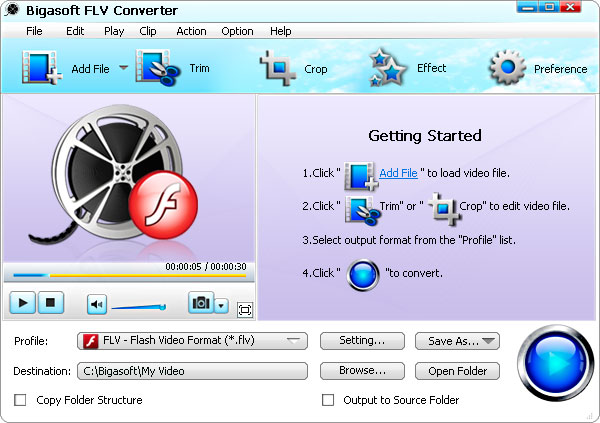
Bigasoft FLV Converter
 Bigasoft FLV Converter is a great way to help you convert FLV and online videos like YouTube video, MySpace and so on to popular video formats such as AVI, Xvid, DivX, MP4, WMV, MOV, MPEG, MPG, etc. with excellent quality for fun beyond web pages.
____________________________________________________________
More Info
Audio & Multimedia::Rippers & Converters
flv converter, youtube converter, convert flv, convert flv to avi, convert flv to mp4, convert flv to wmv, convert flv to mov, convert flv to mpeg, convert flv to mp3
Posted by
Unknown on Monday, July 15, 2013
Posted by
Unknown
Author's description

Free portable video converter rich in features. “Video to Video” converter supports following output formats: Avi, DivX, Xvid, Mp4, H-264, flv, swf, DVD, Mpeg-1, Mpeg-2, Mov, 3gp, wmv, asf, mkv, dv, WebM, mp3, aac, ac3, wav, vorbis, amr and many others. Over 200 of input formats. Comes with over 700+ presets for many devices: iPhone, iPad, iPod, Mobile Phones, Nokia, Samsung, YouTube, PS3, Apple TV, Android, Blackberry, PSP, PS Vita...With DVD Ripper you can convert your DVD discs. Video Joiner merges several video files into one. Video Splitter extracts scenes from a video file. DVD Authoring converts to DVD format.DVD Video Burner burns video files to DVD. Large selection of presets and the ability to create custom presets...
True portable software, does'n leave any traces on the host computer. There are a many ready presets so users do not need to have experience to convert video files.
This software is for everyone because nowadays most people need to convert videos and audio.
If you really download it you click below this button.
Posted by
Unknown on Friday, July 5, 2013
DVDVideoMedia Free WMA MP3 Converter free download
- Free & fast download
- Always available
- Tested virus-free